
The tidyterra package
tidyterra adds common tidyverse methods for SpatRaster and SpatVector objects from the terra package, and provides geom_spat*() geoms for plotting them with ggplot2.
Why tidyterra?
Spat* objects differ from regular data frames: they are S4 objects with their own syntax and computational methods (implemented in terra). By providing tidyverse verbs, especially dplyr and tidyr methods, tidyterra lets users manipulate Spat* objects in a style similar to working with tabular data.
Note that terra is generally faster. Learning some terra syntax is recommended because tidyterra functions call the corresponding terra equivalents when possible.
A note for advanced terra users
tidyterra is not optimized for performance. Operations such as filter() and mutate() can be slower than their terra counterparts.
As a rule of thumb, tidyterra is most suitable for objects with fewer than 10,000,000 data slots (i.e., terra::ncell(a_rast) * terra::nlyr(a_rast) < 1e7).
Get started with tidyterra
Load tidyterra together with core tidyverse packages:
Currently, the following methods are available:
Let’s see some of these methods in action.
SpatRaster objects
Example using a SpatRaster:
library(terra)
f <- system.file("extdata/cyl_temp.tif", package = "tidyterra")

temp <- rast(f)

temp
#> class       : SpatRaster
#> size        : 87, 118, 3  (nrow, ncol, nlyr)
#> resolution  : 3881.255, 3881.255  (x, y)
#> extent      : -612335.4, -154347.3, 4283018, 4620687  (xmin, xmax, ymin, ymax)
#> coord. ref. : World_Robinson (ESRI:54030)
#> source      : cyl_temp.tif
#> names       :   tavg_04,   tavg_05,   tavg_06
#> min values  :  1.885463,  5.817587, 10.463377
#> max values  : 13.283829, 16.740898, 21.113781

mod <- temp |>
  select(-1) |>
  mutate(newcol = tavg_06 - tavg_05) |>
  relocate(newcol, .before = 1) |>
  replace_na(list(newcol = 3)) |>
  rename(difference = newcol)

mod
#> class       : SpatRaster
#> size        : 87, 118, 3  (nrow, ncol, nlyr)
#> resolution  : 3881.255, 3881.255  (x, y)
#> extent      : -612335.4, -154347.3, 4283018, 4620687  (xmin, xmax, ymin, ymax)
#> coord. ref. : World_Robinson (ESRI:54030)
#> source(s)   : memory
#> names       : difference,   tavg_05,   tavg_06
#> min values  :   2.817647,  5.817587, 10.463377
#> max values  :   5.307511, 16.740898, 21.113781
In this example we:
- Removed the first layer (
tavg_04). - Created a new layer
newcolas the difference betweentavg_06andtavg_05. - Relocated
newcolto be the first layer. - Replaced
NAvalues innewcolwith3. - Renamed
newcoltodifference.
Throughout these steps, core properties of the SpatRaster (number of cells, rows and columns, extent, resolution and CRS) remain unchanged. Other verbs such as filter(), slice() or drop_na() may alter these properties in a manner analogous to how row operations affect data frames.
SpatVector objects
Since tidyterra version 0.4.0, most dplyr and tidyr verbs work with SpatVector objects, so you can arrange, group and summarise their attributes.
lux <- system.file("ex/lux.shp", package = "terra")

v_lux <- vect(lux)

v_lux |>
  # Create categories.
  mutate(gr = cut(POP / 1000, 5)) |>
  group_by(gr) |>
  # Summarize by group.
  summarise(
    n = n(),
    tot_pop = sum(POP),
    mean_area = mean(AREA)
  ) |>
  # Arrange groups.
  arrange(desc(gr))
#> class       : SpatVector
#> geometry    : polygons
#> dimensions  : 3, 4  (geometries, attributes)
#> extent      : 5.74414, 6.528252, 49.44781, 50.18162  (xmin, xmax, ymin, ymax)
#> coord. ref. : lon/lat WGS 84 (EPSG:4326)
#> names       :          gr     n tot_pop mean_area
#> type        :      <fact> <int>   <num>     <num>
#> values      :   (147,183]     2  359427       244
#>               (40.7,76.1]     1   48187       185
#>               (4.99,40.7]     9  194391   209.778
As with SpatRaster, essential properties such as geometry and CRS are preserved during these operations.
Plotting with ggplot2
SpatRaster objects
When a SpatRaster has a CRS defined (terra::crs(a_rast) != ""), the geom uses ggplot2::coord_sf() and can be reprojected to match other spatial layers.
library(ggplot2)

# A faceted SpatRaster.

ggplot() +
  geom_spatraster(data = temp) +
  facet_wrap(~lyr) +
  scale_fill_whitebox_c(
    palette = "muted",
    na.value = "white"
  )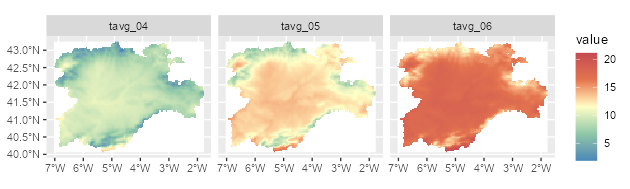
A faceted map using a SpatRaster.
# Contour lines for a specific layer.

f_volcano <- system.file("extdata/volcano2.tif", package = "tidyterra")
volcano2 <- rast(f_volcano)

ggplot() +
  geom_spatraster(data = volcano2) +
  geom_spatraster_contour(data = volcano2, breaks = seq(80, 200, 5)) +
  scale_fill_whitebox_c() +
  coord_sf(expand = FALSE) +
  labs(fill = "elevation")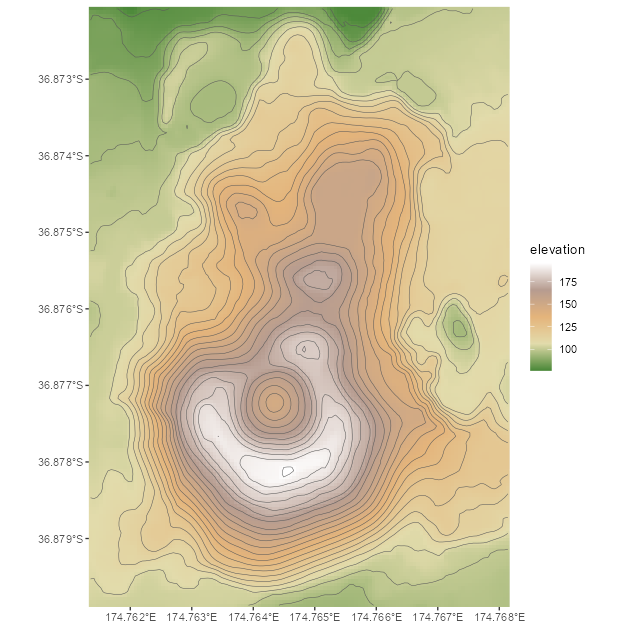
Contour line plot for a SpatRaster.
# Filled contours.

ggplot() +
  geom_spatraster_contour_filled(data = volcano2) +
  scale_fill_whitebox_d(palette = "atlas") +
  labs(fill = "elevation")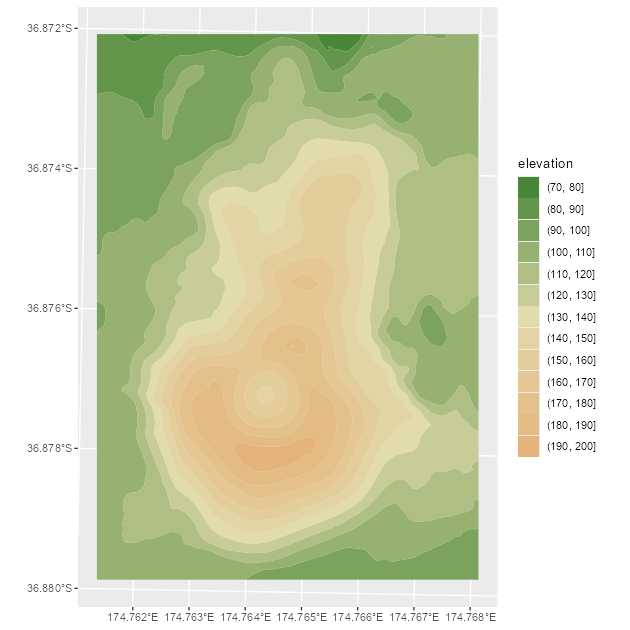
Filled contour plot for a SpatRaster.
tidyterra also supports RGB SpatRaster objects for imagery:
# Read a vector.

f_v <- system.file("extdata/cyl.gpkg", package = "tidyterra")
v <- vect(f_v)

# Read a tile.
f_rgb <- system.file("extdata/cyl_tile.tif", package = "tidyterra")

r_rgb <- rast(f_rgb)

rgb_plot <- ggplot(v) +
  geom_spatraster_rgb(data = r_rgb) +
  geom_spatvector(fill = NA, size = 1)

rgb_plot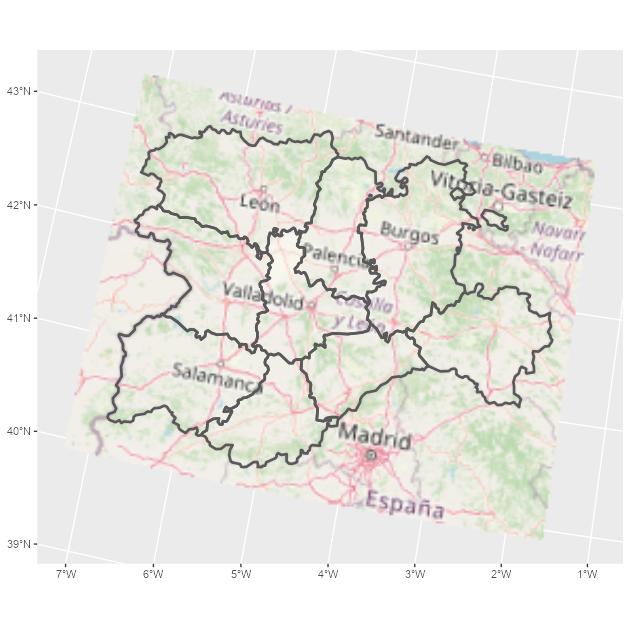
A map combining an RGB SpatRaster and a SpatVector.
tidyterra includes color scales suitable for hypsometric and bathymetric maps:
asia <- rast(system.file("extdata/asia.tif", package = "tidyterra"))

asia
#> class       : SpatRaster
#> size        : 164, 306, 1  (nrow, ncol, nlyr)
#> resolution  : 31836.23, 31847.57  (x, y)
#> extent      : 7619120, 1.736101e+07, -1304745, 3918256  (xmin, xmax, ymin, ymax)
#> coord. ref. : WGS 84 / Pseudo-Mercator (EPSG:3857)
#> source      : asia.tif
#> name        : file44bc291153f2
#> min value   :     -9558.467773
#> max value   :      5801.927246

ggplot() +
  geom_spatraster(data = asia) +
  scale_fill_hypso_tint_c(
    palette = "gmt_globe",
    labels = scales::label_number(),
    # Further refinements
    breaks = c(-10000, -5000, 0, 2000, 5000, 8000),
    guide = guide_colorbar(reverse = TRUE)
  ) +
  labs(
    fill = "elevation (m)",
    title = "Hypsometric map of Asia"
  ) +
  theme(
    legend.position = "bottom",
    legend.title.position = "top",
    legend.key.width = rel(3),
    legend.ticks = element_line(colour = "black", linewidth = 0.3),
    legend.direction = "horizontal"
  )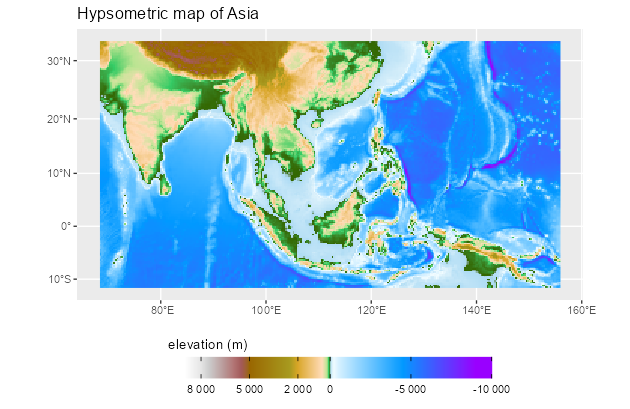
Map of Asia including hypsometric tints.
SpatVector objects
Plot SpatVector objects with geom_spatvector():
lux <- system.file("ex/lux.shp", package = "terra")

v_lux <- terra::vect(lux)

ggplot(v_lux) +
  geom_spatvector(aes(fill = POP), color = "white") +
  geom_spatvector_text(aes(label = NAME_2), color = "grey90") +
  scale_fill_binned(labels = scales::number_format()) +
  coord_sf(crs = 3857)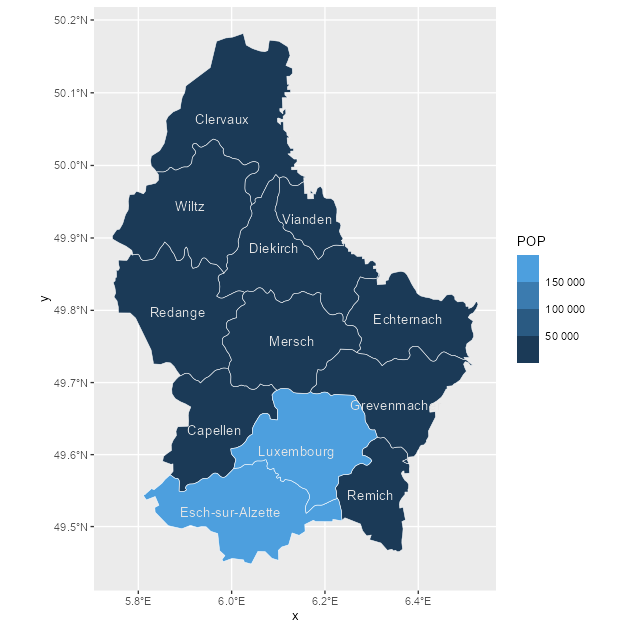
Choropleth map with a SpatVector object.
Implementation-wise, tidyterra converts terra::vect() output to sf via sf::st_as_sf() and then uses ggplot2::geom_sf() to render the layer.
You can also aggregate SpatVector objects easily:
# Dissolving
v_lux |>
  # Create categories.
  mutate(gr = cut(POP / 1000, 5)) |>
  group_by(gr) |>
  # Summarize by group.
  summarise(
    n = n(),
    tot_pop = sum(POP),
    mean_area = mean(AREA)
  ) |>
  ggplot() +
  geom_spatvector(aes(fill = tot_pop), color = "black") +
  geom_spatvector_label(aes(label = gr)) +
  coord_sf(crs = 3857)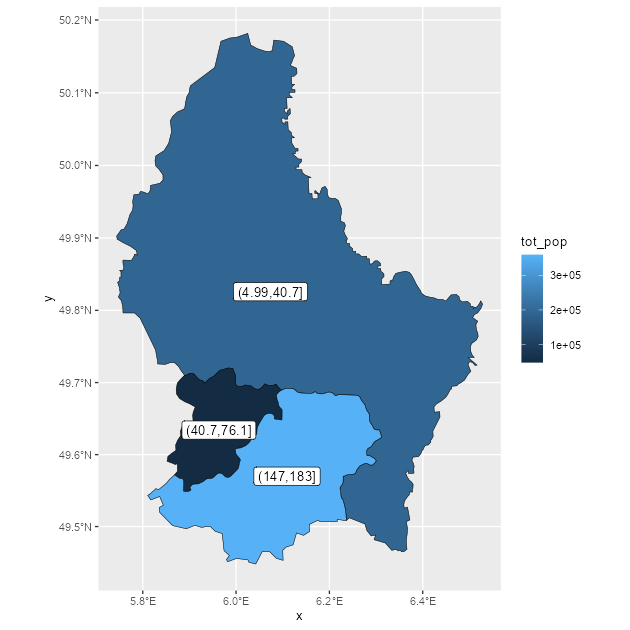
Dissolving SpatVector objects by group.
# Repeat while keeping internal boundaries.
v_lux |>
  # Create categories.
  mutate(gr = cut(POP / 1000, 5)) |>
  group_by(gr) |>
  # Summarize by group without dissolving.
  summarise(
    n = n(),
    tot_pop = sum(POP),
    mean_area = mean(AREA),
    .dissolve = FALSE
  ) |>
  ggplot() +
  geom_spatvector(aes(fill = tot_pop), color = "black") +
  geom_spatvector_label(aes(label = gr)) +
  coord_sf(crs = 3857)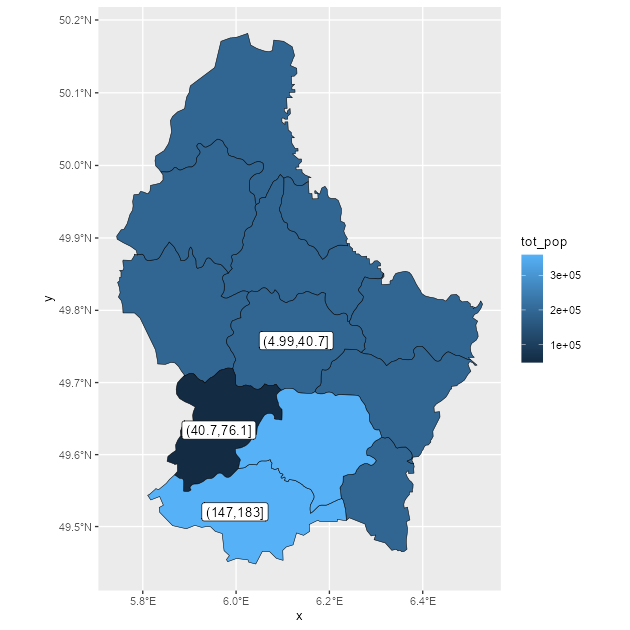
Dissolving SpatVector objects by group, keeping internal boundaries.