Convert a .tmTheme or .json file that defines a TextMate or
Visual Studio Code theme and write the equivalent RStudio .rstheme
file.
Optionally, the generated theme can be installed and applied to the RStudio IDE.
Important: This function only works in RStudio. It returns NULL
when called from other IDEs.
Usage
convert_to_rstudio_theme(
  path,
  outfile = tempfile(fileext = ".rstheme"),
  name = NULL,
  use_italics = TRUE,
  output_style = "expanded",
  force = FALSE,
  apply = FALSE
)
Arguments
- path
Path or URL to a TextMate theme file (
.tmThemeformat) or a Visual Studio Code theme file (.jsonformat).- outfile
Path where the resulting file will be written. Defaults to a temporary file created with
tempfile().- name
Theme name. If
NULL, the name from the input file is used.- use_italics
Logical. Use italics in the resulting theme. Defaults to
TRUE, although some themes may look better without italics.- output_style
Bracketing and formatting style of the CSS output. Possible styles:
"nested","expanded","compact", and"compressed".- force
Whether to force the operation and overwrite an existing file with the same name.
Default:FALSE.- apply
Logical. Apply the theme with
rstudioapi::applyTheme().
Value
This function is called for its side effects. It writes a .rstheme file to
outfile and returns the path. If force or apply is TRUE, it installs
the theme. If apply is TRUE, it also applies the theme to your
RStudio IDE.
Details
RStudio supports custom editor themes in two formats, .tmTheme and
.rstheme. The .tmTheme format originated with TextMate and has become
a common theme format. This tmTheme editor hosts a large collection of
.tmTheme files. The .rstheme format is specific to RStudio.
To switch editor themes, go to Tools > Global Options > Appearance > Add
and use the editor theme selector.
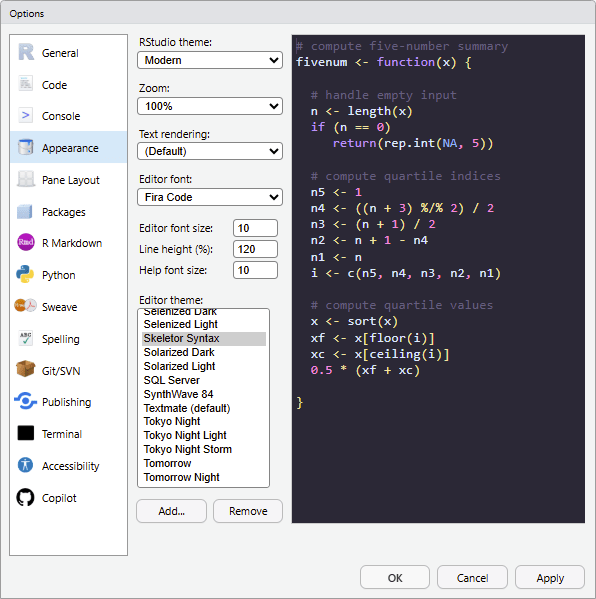
For more information, see https://docs.posit.co/ide/user/ide/guide/ui/appearance.html.
See also
read_vs_theme()andread_tm_theme()to inspect input theme files.install_rstudiothemes()to install bundled themes.rstudioapi::addTheme()andrstudioapi::applyTheme()to install or apply an RStudio theme directly.
Theme file converters:
convert_tm_to_vs_theme(),
convert_vs_to_tm_theme()
Examples
if (on_rstudio() && interactive()) {
  vstheme <- system.file("ext/skeletor-syntax-color-theme.json",
    package = "rstudiothemes"
  )

  # Apply the theme for 10 seconds to demonstrate the effect.
  current_theme <- rstudioapi::getThemeInfo()$editor

  # Print the current theme name.
  current_theme
  convert_to_rstudio_theme(vstheme,
    name = "A testing theme",
    apply = TRUE, force = TRUE
  )

  Sys.sleep(10)

  rstudioapi::applyTheme(current_theme)
  rstudioapi::removeTheme("A testing theme")
}
#> ! Detected GUI "X11".