
nominatimlite provides a lightweight interface to the Nominatim API. It supports free-form and structured address searches, reverse geocoding, amenity lookup and address lookup by OpenStreetMap (OSM) object identifier. Results are returned as tibbles or sf objects.
The full site with examples and vignettes is available at https://dieghernan.github.io/nominatimlite/.
What is Nominatim?
Nominatim searches OpenStreetMap data by name and address (geocoding) and reverse geocodes geographic coordinates.
Why nominatimlite?
nominatimlite accesses the Nominatim API without requiring the curl package. This makes the package useful in environments where curl is not available. API requests use base R functions instead.
Recommended packages
Related packages provide broader interfaces to geocoding services and OpenStreetMap data:
- tidygeocoder (Cambon et al. 2021) provides an interface to geocoding services such as Nominatim, Google, TomTom and Mapbox.
- osmdata (Padgham et al. 2017) downloads spatial data from OpenStreetMap with the Overpass API.
- arcgeocoder (Hernangómez 2024) provides a lightweight interface for geocoding with the ArcGIS REST API service.
Installation
Install nominatimlite from CRAN:
install.packages("nominatimlite")Usage
sf output
Use functions with the _sf suffix to return results as sf objects:
library(nominatimlite)

# Search for Pizza Hut locations in California.

CA <- geo_lite_sf("California", points_only = FALSE)

pizzahut <- geo_lite_sf(
  "Pizza Hut, California",
  limit = 50,
  custom_query = list(countrycodes = "us")
)

library(ggplot2)

ggplot(CA) +
  geom_sf() +
  geom_sf(data = pizzahut, col = "red")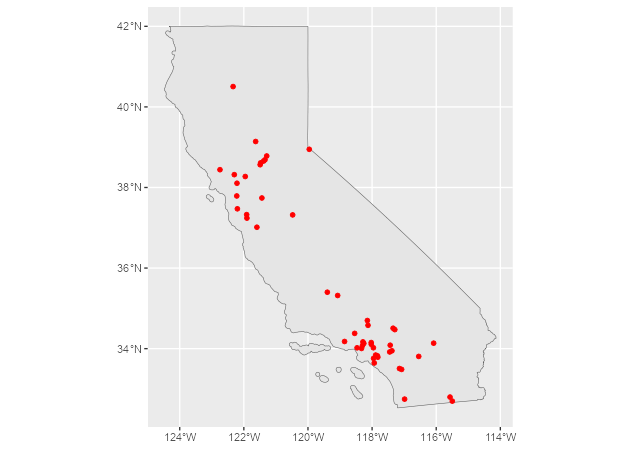
Set points_only = FALSE to return polygon and line geometries when they are available from the Nominatim API:
# A building, returned as a polygon.
sol_poly <- geo_lite_sf("Statue of Liberty, NY, USA", points_only = FALSE)

ggplot(sol_poly) +
  geom_sf()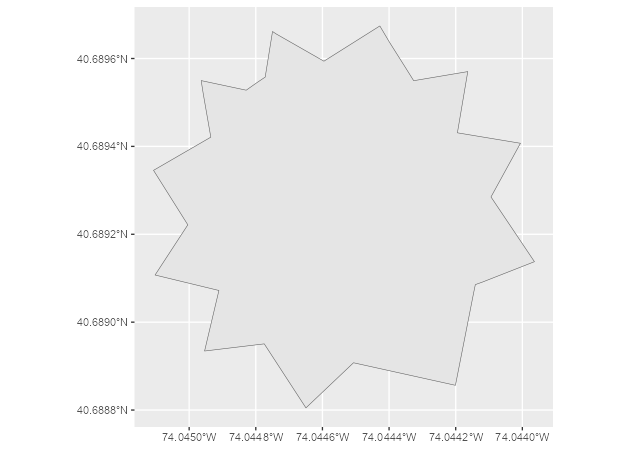
# Default, returned as a point.
dayton <- geo_lite_sf("Dayton, OH")
# A US state, returned as a polygon.
ohio_state <- geo_lite_sf("Ohio, USA", points_only = FALSE)
# A river, returned as a line.
ohio_river <- geo_lite_sf("Ohio river", points_only = FALSE)

ggplot() +
  geom_sf(data = ohio_state) +
  geom_sf(data = dayton, color = "red", pch = 4) +
  geom_sf(data = ohio_river, color = "blue")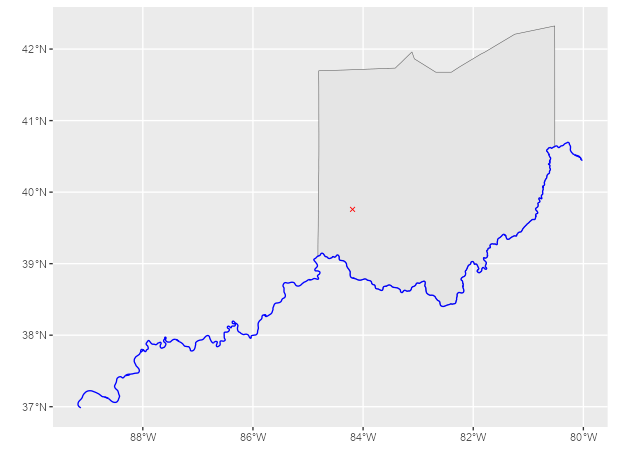
Address search and reverse geocoding
The examples in this section are adapted from the tidygeocoder package.
Use geo_lite() to search for addresses with free-form queries:
# Create a data frame with addresses.
some_addresses <- dplyr::tribble(
  ~name, ~addr,
  "White House", "1600 Pennsylvania Ave NW, Washington, DC",
  "Transamerica Pyramid", "600 Montgomery St, San Francisco, CA 94111",
  "Willis Tower", "233 S Wacker Dr, Chicago, IL 60606"
)

# Geocode the addresses.
lat_longs <- geo_lite(
  some_addresses$addr,
  lat = "latitude",
  long = "longitude",
  progressbar = FALSE
)
By default, geo_lite() returns the query, latitude, longitude and address columns. Set full_results = TRUE to return all available fields from the Nominatim API.
| query | latitude | longitude | address |
|---|---|---|---|
| 1600 Pennsylvania Ave NW, Washington, DC | 38.89764 | -77.03655 | White House, 1600, Pennsylvania Avenue Northwest, Ward 2, Washington, District of Columbia, 20500, United States |
| 600 Montgomery St, San Francisco, CA 94111 | 37.79519 | -122.40279 | Transamerica Pyramid, 600, Montgomery Street, Financial District, San Francisco, California, 94111, United States |
| 233 S Wacker Dr, Chicago, IL 60606 | 41.87874 | -87.63596 | Willis Tower, 233, South Wacker Drive, Financial District, Loop, Chicago, South Chicago Township, Cook County, Illinois, 60606, United States |
Table 1: Geocoded addresses.
Use reverse_geo_lite() to reverse geocode latitude and longitude coordinates. The lat and long arguments use the results from the address search above. The address argument specifies the name of the output column that contains each single-line address.
reverse <- reverse_geo_lite(
  lat = lat_longs$latitude,
  long = lat_longs$longitude,
  address = "address_found",
  progressbar = FALSE
)| address_found | lat | lon |
|---|---|---|
| White House, 1600, Pennsylvania Avenue Northwest, Ward 2, Washington, District of Columbia, 20500, United States | 38.89764 | -77.03655 |
| 600, Montgomery Street, Financial District, San Francisco, California, 94111, United States | 37.79541 | -122.40257 |
| 233, South Wacker Drive, Financial District, Loop, Chicago, South Chicago Township, Cook County, Illinois, 60606, United States | 41.87874 | -87.63589 |
Table 2: Reverse-geocoded addresses.
See the Nominatim search API documentation for additional parameters to pass to custom_query.
Citation
Hernangómez D (2026). nominatimlite: Interface to the Nominatim API. doi:10.32614/CRAN.package.nominatimlite. https://dieghernan.github.io/nominatimlite/.
A BibTeX entry for LaTeX users is shown below.
@Manual{R-nominatimlite,
  title = {{nominatimlite}: Interface to the {Nominatim} {API}},
  doi = {10.32614/CRAN.package.nominatimlite},
  author = {Diego Hernangómez},
  year = {2026},
  version = {0.7.0},
  url = {https://dieghernan.github.io/nominatimlite/},
  abstract = {Provides a lightweight interface to the Nominatim API <https://nominatim.org/release-docs/latest/>. It supports free-form and structured address searches, searches for addresses from coordinates, amenity lookup and address lookup by OpenStreetMap object identifier. It returns results as tibble data frames or sf objects.},
}