
arcgeocoder provides a lightweight interface to the ArcGIS REST API. It geocodes single-line and structured addresses, reverse geocodes coordinates and finds places by category.
The package website includes examples and vignettes: https://dieghernan.github.io/arcgeocoder/.
Why arcgeocoder?
arcgeocoder accesses the ArcGIS REST API without requiring an API key or an additional HTTP package such as curl. It uses base R download functions, which keeps its dependency footprint small.
The package provides focused interfaces to the findAddressCandidates and reverseGeocode endpoints. It supports single-line addresses, structured address components, category filters and reverse geocoding.
Recommended packages
The following packages provide related geocoding features:
- tidygeocoder (Cambon et al. 2021) provides an interface to ArcGIS, Nominatim (OpenStreetMap), Google, TomTom, Mapbox and other geocoding services.
- nominatimlite (Hernangómez 2024) is similar to arcgeocoder but uses data from OpenStreetMap through the Nominatim API.
Usage
Geocoding and reverse geocoding
The examples in this section are adapted from the tidygeocoder package.
The arc_geo() function converts single-line addresses into geographic coordinates. It requires no API key or additional setup.
library(arcgeocoder)
library(dplyr)

# Create a data frame with addresses.
some_addresses <- tribble(
  ~name, ~addr,
  "White House", "1600 Pennsylvania Ave NW, Washington, DC",
  "Transamerica Pyramid", "600 Montgomery St, San Francisco, CA 94111",
  "Willis Tower", "233 S Wacker Dr, Chicago, IL 60606"
)

# Geocode the addresses.
lat_longs <- arc_geo(
  some_addresses$addr,
  lat = "latitude",
  long = "longitude",
  progressbar = FALSE
)
By default, arc_geo() returns a small set of fields. Set full_results = TRUE to return all available API fields.
| query | latitude | longitude | address | score | x | y | xmin | ymin | xmax | ymax | wkid | latestWkid |
|---|---|---|---|---|---|---|---|---|---|---|---|---|
| 1600 Pennsylvania Ave NW, Washington, DC | 38.89768 | -77.03655 | 1600 Pennsylvania Ave NW, Washington, District of Columbia, 20500 | 100 | -77.03655 | 38.89768 | -77.03755 | 38.89668 | -77.03555 | 38.89868 | 4326 | 4326 |
| 600 Montgomery St, San Francisco, CA 94111 | 37.79516 | -122.40273 | 600 Montgomery St, San Francisco, California, 94111 | 100 | -122.40273 | 37.79516 | -122.40373 | 37.79416 | -122.40173 | 37.79616 | 4326 | 4326 |
| 233 S Wacker Dr, Chicago, IL 60606 | 41.87867 | -87.63587 | 233 S Wacker Dr, Chicago, Illinois, 60606 | 100 | -87.63587 | 41.87867 | -87.63687 | 41.87767 | -87.63487 | 41.87967 | 4326 | 4326 |
The arc_reverse_geo() function converts longitude and latitude values into addresses. Supply longitude values to x and latitude values to y. The following example uses the coordinates returned by the previous query. The address argument sets the name of the address column in the output.
reverse <- arc_reverse_geo(
  x = lat_longs$longitude,
  y = lat_longs$latitude,
  address = "address_found",
  progressbar = FALSE
)| x | y | address_found |
|---|---|---|
| -77.03655 | 38.89768 | White House, 1600 Pennsylvania Ave NW, Washington, DC, 20500, USA |
| -122.40273 | 37.79516 | Chess Ventures, 600 Montgomery St, San Francisco, CA, 94111, USA |
| -87.63587 | 41.87867 | Willis Tower, Chicago, IL, USA |
The arc_geo_categories() function finds places by category near a location or within a bounding box. Available categories are documented in the arc_categories dataset and in the ArcGIS category filtering documentation.
The following example finds food-related places, such as restaurants, coffee shops and bakeries, near the Eiffel Tower in France.
library(ggplot2) # For plotting.

# Step 1: Locate the Eiffel Tower using a structured query.

eiffel_tower <- arc_geo_multi(
  address = "Tour Eiffel",
  city = "Paris",
  countrycode = "FR",
  langcode = "FR",
  custom_query = list(outFields = "LongLabel")
)

# Display results.
eiffel_tower |>
  select(lon, lat, LongLabel)
#> # A tibble: 1 × 3
#>     lon   lat LongLabel
#>   <dbl> <dbl> <chr>
#> 1  2.29  48.9 Tour Eiffel, 3 Rue de l'Université, 75007, 7e Arrondissement, Par…

# Use `lon` and `lat` as a reference location for `category = "Food"`.
food_eiffel <- arc_geo_categories(
  "Food",
  x = eiffel_tower$lon,
  y = eiffel_tower$lat,
  limit = 50,
  full_results = TRUE
)

# Plot by food type.
ggplot(eiffel_tower, aes(x, y)) +
  geom_point(shape = 15, color = "blue", size = 4) +
  geom_point(data = food_eiffel, aes(x, y, color = Type)) +
  labs(
    title = "Food near the Eiffel Tower",
    subtitle = "Using arcgeocoder",
    color = "Type of place",
    x = "",
    y = "",
    caption = "Data from the ArcGIS REST API"
  )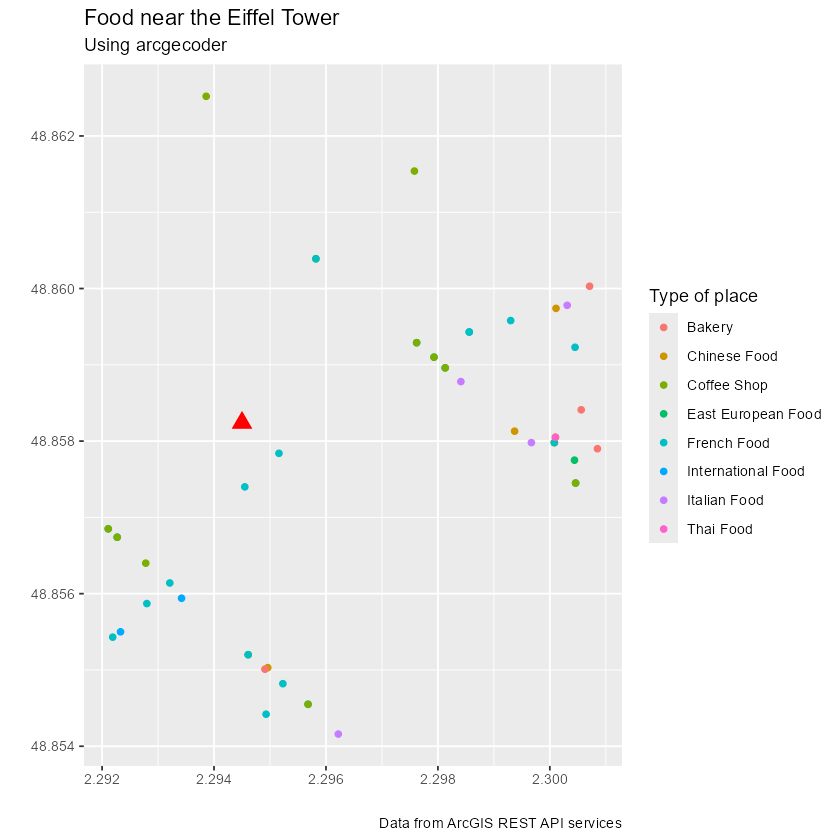
Example: Food places near the Eiffel Tower