
The tidyterra package
tidyterra provides common tidyverse methods for SpatRaster and SpatVector objects created with the terra package. It also provides geom_spat*() geoms and scales for plotting those objects with ggplot2.
Why tidyterra?
Spat* objects differ from regular data frames: they are S4 objects with their own syntax and computational methods (implemented in terra). By providing tidyverse verbs, especially dplyr and tidyr methods, tidyterra lets users manipulate Spat* objects in a style familiar from tabular data workflows.
Note that terra is generally faster. Learning some terra syntax is recommended because tidyterra functions call the corresponding terra equivalents when possible.
A note for advanced terra users
tidyterra is not optimized for performance. Operations such as filter() and mutate() can be slower than their terra counterparts.
As a rule of thumb, tidyterra is most suitable for objects with fewer than 10,000,000 data slots (i.e., terra::ncell(a_rast) * terra::nlyr(a_rast) < 1e7).
Get started with tidyterra
Load tidyterra together with core tidyverse packages:
The following methods are available:
The following sections show some of these methods in action.
SpatRaster objects
This example uses a SpatRaster:
library(terra)
f <- system.file("extdata/cyl_temp.tif", package = "tidyterra")

temp <- rast(f)

temp
#> class       : SpatRaster
#> size        : 87, 118, 3  (nrow, ncol, nlyr)
#> resolution  : 3881.255, 3881.255  (x, y)
#> extent      : -612335.4, -154347.3, 4283018, 4620687  (xmin, xmax, ymin, ymax)
#> coord. ref. : World_Robinson (ESRI:54030)
#> source      : cyl_temp.tif
#> names       :   tavg_04,   tavg_05,   tavg_06
#> min values  :  1.885463,  5.817587, 10.463377
#> max values  : 13.283829, 16.740898, 21.113781

mod <- temp |>
  select(-1) |>
  mutate(newcol = tavg_06 - tavg_05) |>
  relocate(newcol, .before = 1) |>
  replace_na(list(newcol = 3)) |>
  rename(difference = newcol)

mod
#> class       : SpatRaster
#> size        : 87, 118, 3  (nrow, ncol, nlyr)
#> resolution  : 3881.255, 3881.255  (x, y)
#> extent      : -612335.4, -154347.3, 4283018, 4620687  (xmin, xmax, ymin, ymax)
#> coord. ref. : World_Robinson (ESRI:54030)
#> source(s)   : memory
#> names       : difference,   tavg_05,   tavg_06
#> min values  :   2.817647,  5.817587, 10.463377
#> max values  :   5.307511, 16.740898, 21.113781
In this example we:
- Removed the first layer (
tavg_04). - Created a new layer
newcolas the difference betweentavg_06andtavg_05. - Relocated
newcolto be the first layer. - Replaced
NAvalues innewcolwith3. - Renamed
newcoltodifference.
Throughout these steps, core properties of the SpatRaster (number of cells, rows, columns, extent, resolution and CRS) remain unchanged. Other verbs such as filter(), slice() or drop_na() may alter these properties in a manner analogous to how row operations affect data frames.
SpatVector objects
Most dplyr and tidyr verbs work with SpatVector objects, so you can arrange, group and summarize their attributes.
lux <- system.file("ex/lux.shp", package = "terra")

v_lux <- vect(lux)

v_lux |>
  # Create categories.
  mutate(gr = cut(POP / 1000, 5)) |>
  group_by(gr) |>
  # Summarize by group.
  summarise(
    n = n(),
    tot_pop = sum(POP),
    mean_area = mean(AREA)
  ) |>
  # Arrange groups.
  arrange(desc(gr))
#> class       : SpatVector
#> geometry    : polygons
#> dimensions  : 3, 4  (geometries, attributes)
#> extent      : 5.74414, 6.528252, 49.44781, 50.18162  (xmin, xmax, ymin, ymax)
#> coord. ref. : lon/lat WGS 84 (EPSG:4326)
#> names       :          gr     n tot_pop mean_area
#> type        :      <fact> <int>   <num>     <num>
#> values      :   (147,183]     2  359427       244
#>               (40.7,76.1]     1   48187       185
#>               (4.99,40.7]     9  194391   209.778
As with SpatRaster, essential properties such as geometry and CRS are preserved during these operations.
Plotting with ggplot2
SpatRaster objects
When a SpatRaster has a CRS defined (terra::crs(a_rast) != ""), the geom uses ggplot2::coord_sf() and can be reprojected to match other spatial layers.
library(ggplot2)

# Facet a SpatRaster object.

ggplot() +
  geom_spatraster(data = temp) +
  facet_wrap(~lyr) +
  scale_fill_whitebox_c(
    palette = "muted",
    na.value = "white"
  )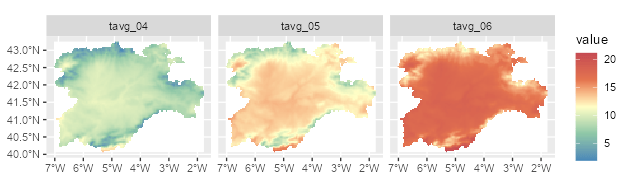
Faceted map using a SpatRaster object.
# Contour lines for a specific layer.

f_volcano <- system.file("extdata/volcano2.tif", package = "tidyterra")
volcano2 <- rast(f_volcano)

ggplot() +
  geom_spatraster(data = volcano2) +
  geom_spatraster_contour(data = volcano2, breaks = seq(80, 200, 5)) +
  scale_fill_whitebox_c() +
  coord_sf(expand = FALSE) +
  labs(fill = "elevation")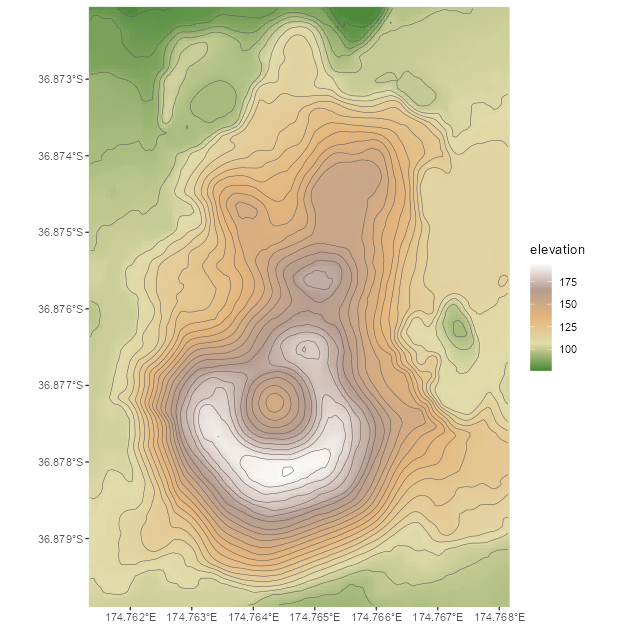
Contour line plot for a SpatRaster object.
# Filled contours.

ggplot() +
  geom_spatraster_contour_filled(data = volcano2) +
  scale_fill_whitebox_d(palette = "atlas") +
  labs(fill = "elevation")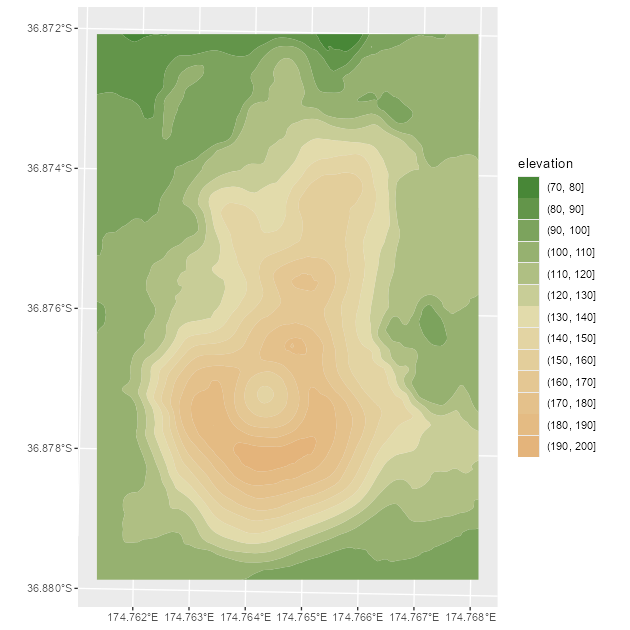
Filled contour plot for a SpatRaster object.
tidyterra also supports RGB SpatRaster objects for imagery:
# Read a vector.

f_v <- system.file("extdata/cyl.gpkg", package = "tidyterra")
v <- vect(f_v)

# Read a tile.
f_rgb <- system.file("extdata/cyl_tile.tif", package = "tidyterra")

r_rgb <- rast(f_rgb)

rgb_plot <- ggplot(v) +
  geom_spatraster_rgb(data = r_rgb) +
  geom_spatvector(fill = NA, size = 1)

rgb_plot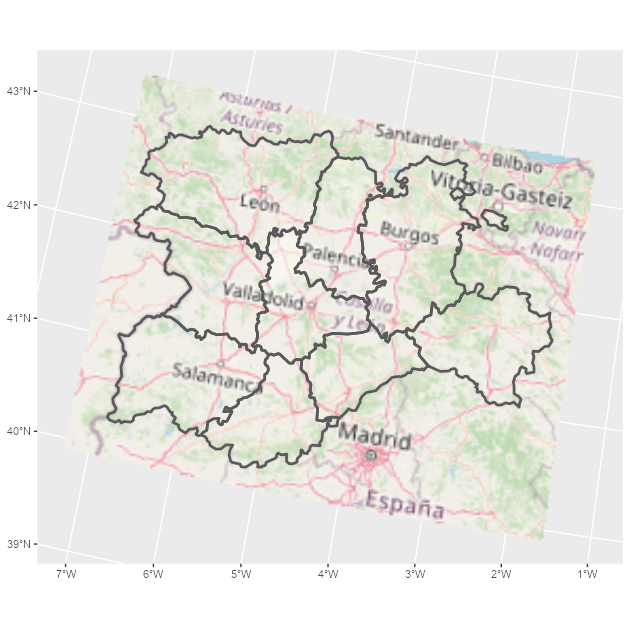
Map combining an RGB SpatRaster object and a SpatVector object.
tidyterra includes color scales and hypsometric tints suitable for topographic and bathymetric maps:
asia <- rast(system.file("extdata/asia.tif", package = "tidyterra"))

asia
#> class       : SpatRaster
#> size        : 164, 306, 1  (nrow, ncol, nlyr)
#> resolution  : 31836.23, 31847.57  (x, y)
#> extent      : 7619120, 1.736101e+07, -1304745, 3918256  (xmin, xmax, ymin, ymax)
#> coord. ref. : WGS 84 / Pseudo-Mercator (EPSG:3857)
#> source      : asia.tif
#> name        : file44bc291153f2
#> min value   :     -9558.467773
#> max value   :      5801.927246

ggplot() +
  geom_spatraster(data = asia) +
  scale_fill_hypso_tint_c(
    palette = "gmt_globe",
    labels = scales::label_number(),
    # Further refinements
    breaks = c(-10000, -5000, 0, 2000, 5000, 8000),
    guide = guide_colorbar(reverse = TRUE)
  ) +
  labs(
    fill = "elevation (m)",
    title = "Hypsometric map of Asia"
  ) +
  theme(
    legend.position = "bottom",
    legend.title.position = "top",
    legend.key.width = rel(3),
    legend.ticks = element_line(colour = "black", linewidth = 0.3),
    legend.direction = "horizontal"
  )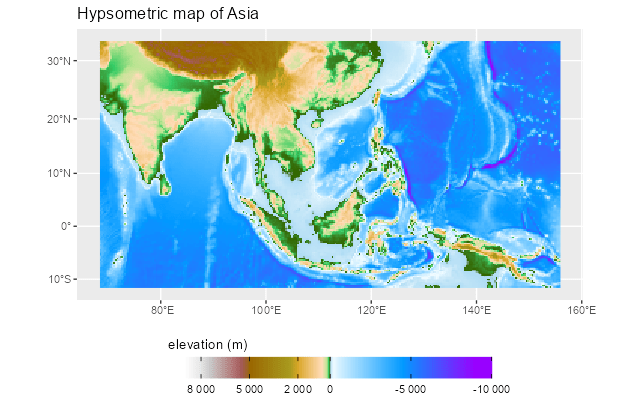
Map of Asia including hypsometric tints.
SpatVector objects
Plot SpatVector objects with geom_spatvector():
lux <- system.file("ex/lux.shp", package = "terra")

v_lux <- terra::vect(lux)

ggplot(v_lux) +
  geom_spatvector(aes(fill = POP), color = "white") +
  geom_spatvector_text(aes(label = NAME_2), color = "grey90") +
  scale_fill_binned(labels = scales::number_format()) +
  coord_sf(crs = 3857)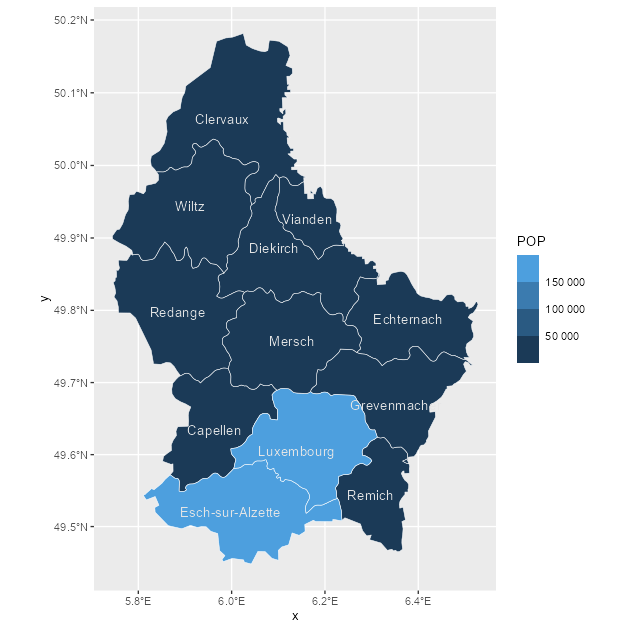
Choropleth map with a SpatVector object.
Internally, tidyterra converts terra::vect() output to sf with sf::st_as_sf() and then uses ggplot2::geom_sf() to render the layer.
You can also aggregate SpatVector objects easily:
# Dissolve by group.
v_lux |>
  # Create categories.
  mutate(gr = cut(POP / 1000, 5)) |>
  group_by(gr) |>
  # Summarize by group.
  summarise(
    n = n(),
    tot_pop = sum(POP),
    mean_area = mean(AREA)
  ) |>
  ggplot() +
  geom_spatvector(aes(fill = tot_pop), color = "black") +
  geom_spatvector_label(aes(label = gr)) +
  coord_sf(crs = 3857)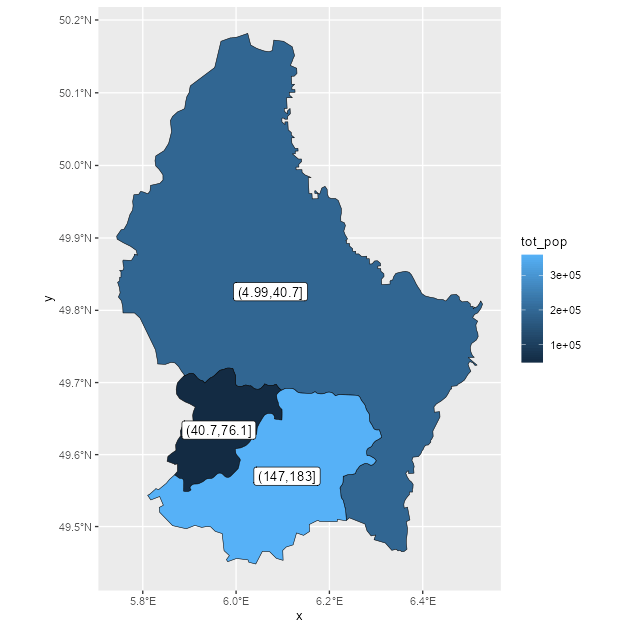
Dissolving SpatVector objects by group.
# Repeat while keeping internal boundaries.
v_lux |>
  # Create categories.
  mutate(gr = cut(POP / 1000, 5)) |>
  group_by(gr) |>
  # Summarize by group without dissolving.
  summarise(
    n = n(),
    tot_pop = sum(POP),
    mean_area = mean(AREA),
    .dissolve = FALSE
  ) |>
  ggplot() +
  geom_spatvector(aes(fill = tot_pop), color = "black") +
  geom_spatvector_label(aes(label = gr)) +
  coord_sf(crs = 3857)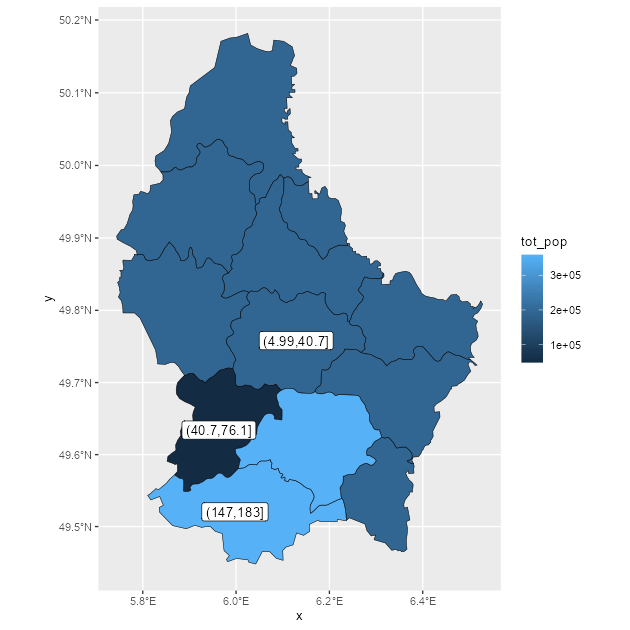
Dissolving SpatVector objects by group, keeping internal boundaries.